Menu & Toolbar Items

Top  Previous  Next

The following pages describe all the different menu items available in the RTCU M2M Studio. Some of the menu items also have a shortcut key, which is shown under each of the menu items. A number of the menu items also have a corresponding button on one of the toolbars. Please see below.


Menubar


File

Edit

View

Project

Settings

Simulator

IEX

Device

Window

Help

Update is available - only shown if an update has been found.


toolbar_standard


This is the Standard toolbar. It has buttons for the following commands:


File: New file

File: Open file

File: Save

File: Save all

File: Close


Edit: Cut

Edit: Copy

Edit: Paste

Edit: Delete


Edit: Undo

Edit: Redo


File: Print

Help: About


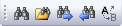
toolbar_find


This is the Find toolbar. It has buttons for the following commands:


Find

Find in project

Find: Next

Find: Previous

Find: Replace


toolbar_bookmarks


This is the Bookmarks toolbar. It has buttons for the following commands:


Bookmark: Toggle

Bookmark: Next

Bookmark: Previous

Bookmark: Clear All


toolbar_project


This is the Project toolbar. It has buttons for the following commands:


Project: New

Project: Open

Project: Close


Project: Settings

Project: Information

Project: Send via Email

Project: Compress


toolbar_project_build


This is the Project Build toolbar. It has buttons for the following commands:


Device: Synchronize

Project: Build

Project: Build All

Project: Cancel Build


toolbar_device


This is the Device toolbar. It has buttons for the following commands:


Device: RTCU Communication Hub - Connect


Device: Halt

Device: Reset


toolbar_device_data


This is the Device Data toolbar. It has buttons for the following commands:


Device: Persistent data

Device: Datalogger

Device: File system

Device: SOS Viewer

Device: SMS messages


toolbar_device_info


This is the Device Information toolbar. It has buttons for the following commands:


Device: IO Monitor

Device: System Information

Device: Network Information

Device: Power Information

Device: Statistics

Device: Fault log


toolbar_device_config


This is the Device Configuration toolbar. It has buttons for the following commands:


Device: Adjust Clock

Device: Set Password

Device: Log / Debug

Device: Power / Battery

Device: Cellular Options

Device: Certificates


toolbar_simulator


This is the Simulator toolbar. It has buttons for the following commands:

Simulator: Show Simulator

Simulator: Stop and Close

Simulator: Build and Run project


toolbar_iex


This is the IEX toolbar. It has buttons for the following commands:


IEX: Launch

IEX: Close

IEX: Connect