Simulator: Power


|
Simulator: Power |
|
|
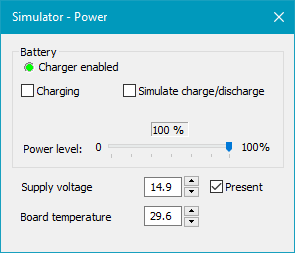
The "Power" window simulates the battery charger, the external supply and the board temperature.
Battery: The "Charger enabled" indicator shows if the battery charger is enabled. It can be controlled with batChargerEnable.
The simulated battery charger can be used in two different ways: 1. Manual control: The "Charging" checkbox can be enabled to make batIsCharging report true and the Power level slider can be adjusted to change the level reported by batPowerLevel. There is no connection between the two controls, so it is possible to e.g. keep charging at 100%. This is useful when the simulator must keep reporting the same state until manually changed.
2. Simulated charge/discharge: Enabling the Simulate charge/discharge checkbox makes the simulator handle the power level and the charging by itself. When external supply is present, charging will be enabled and the power level will slowly rise until 100% is reached. When external supply is removed, the charging is disabled and the power level will slowly drop. To simulate the hysteresis of the real charger, charging will not automatically start if the power level is above 90%.
This is useful to test the more dynamic behavior when the charger is running.
Supply voltage: The provided supply voltage can be read with boardSupplyVoltage. Clearing the "Present" check box will make the device run from battery instead of from external power. boardSupplyType can be use to read the supply type.
Board temperature: The provided board temperature can be read with boardTemperature.
|