Simulator: Debug


Simulator: Debug |
|
|
The "Debug" Window shows the output of any DebugMsg() or DebugFmt() commands called by the application.
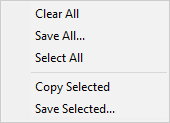
Right-clicking in the debug window shows this menu:
Press "Clear All" to clear the contents of the debug window. Press "Save All" to save the contents of the debug as a text file. Press "Select All" to select all the lines in the debug.
Press "Copy Selected" to copy the selected lines in the debug to the clipboard. Press "Save Selected" to save the selected lines in the debug as a text file.
If a message is longer than 239 characters, it will be split across multiple lines and the split lines will be terminated with "...".
|