guiShowMessage (Function)

Top  Previous  Next

Architecture:

NX32L

Firmware version:

1.00.00


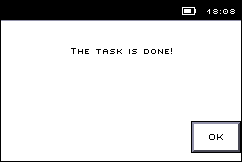
This function shows a dialog, that contains a message and a number of buttons.

The dialog closes either when the user selects one of the buttons, or when it times out.

gui_dialog_ok

Input:

message : STRING

The message to show to the user


timeout : INT (-1, 0..3600) default -1

The number of seconds without activity before the dialog closes by itself. Use -1 for no timeout.


type : INT

The type of buttons to show:

 0        - OK button

 1        - OK and Cancel buttons

 2        - Yes and No buttons

 3        - Yes, No and Cancel buttons.


Returns: INT

4

- No

3

- Yes

2

- Cancel

1

- OK

0

- Timeout.

-1

- Interface is not open (see guiOpen).

-3

- Invalid parameter.

-8

- The text contains invalid characters.

-9

- A dialog is already being shown.

-11

- The GUI API is not supported.


Declaration:

FUNCTION guiShowMessage INT;
VAR_INPUT
   message : STRING;
   type    : INT;
   timeout : INT := -1;
END_VAR;


Example:

INCLUDE rtcu.inc
 
PROGRAM test;
VAR
   rc      : INT;
END_VAR;
 
BEGIN
   ...
   // Show an OK dialog that disappears after 10 seconds
   rc := guiShowMessage(message := "The task is done!", type:=0timeout:=10);
   ...
END;
END_PROGRAM;