guiShowDateInput (Function)

Top  Previous  Next

Architecture:

NX32L

Firmware version:

1.00.00


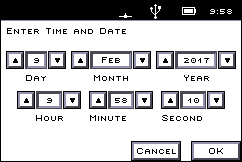
This function shows a dialog that allows the user to enter a date and/or a time.

The dialog closes either when the user selects OK or Cancel, or when it times out.

gui_dialog_date

Input:

message : STRING

The message to show to the user


timeout : INT (-1, 0..3600) default -1

The number of seconds without activity before the dialog closes by itself. Use -1 for no timeout.


style : DINT default 3

The style is a mask that determines the type of dialog to show.

Value

 Style

1

- Show date

2

- Show time

4

- Make the dialog read-only

A style of 3 will show a dialog with both date and time, while a style of 6 will show a read-only time.


timestamp : DINT

Linsec for the initial time/date to show.


Output:

timestamp : DINT

The entered time and date as a linsec.


Returns: INT

2

- Cancel

1

- OK

0

- Timeout

-1

- Interface is not open (see guiOpen).

-3

- Invalid timeout, style or timestamp.

-8

- The text contains invalid characters.

-9

- A dialog is already being shown.

-11

- The GUI API is not supported.


Declaration:

FUNCTION guiShowDateInput INT;
VAR_INPUT
   message   : STRING;
   timeout   : INT := -1;
   style     : DINT := 3;
   timestamp : ACCESS DINT;
END_VAR;


Example:

INCLUDE rtcu.inc
 
PROGRAM test;
VAR
   rc   : INT;
   ts   : DINT;
END_VAR;
 
BEGIN
   ...
   // Ask the user for an arrival time and date, with the current time as starting value
   ts := clockNow();
   rc := guiShowDateInput(message := "Enter the arrival time!", timeout:=30style := 3,
      timestamp := ts);
   IF rc = 1 THEN
      DebugFmt(message:="Arrival time \4 was entered.", v4:=ts);
   END_IF;
   ...
END;
END_PROGRAM;