Maintenance: Transfer firmware


Maintenance: Transfer firmware |
|
|
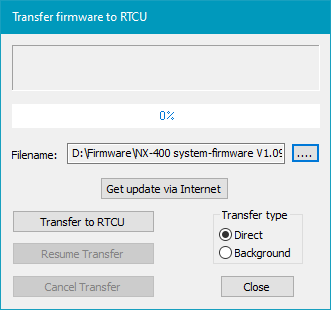
By using "Transfer firmware", it is possible to upload a new firmware revision to a connected RTCU device. It is possible to select a local file or to get a list of the versions available for download by clicking the "Get update via Internet" button. This requires an internet connection.
Depending on the type of RTCU device and/or the connection type, the firmware can be uploaded either as a "Direct" upload or as a "Background" upload.
When using Direct upload, it will halt the execution of the running application and update mode will then be entered.
When using Background upload, the running application will continue to run during the upload. When the upload has finished the actual "switch" to the new firmware, this process will be finished when the device resets next time. One other advantage of the Background upload is that a failed/disconnected upload attempt can be resumed at a later time. When using the Background upload, the Voice section cannot be transferred, and the current Voice data in the device may be overwritten as the device uses the Voice flash memory for its operation. This means that if the application contains Voice data, and the background upload is used, the Voice data will have to be transferred separately after the Background upload has finished. See also the verCheckUpgrade() function-block for more information about how to detect the status of the background upload.
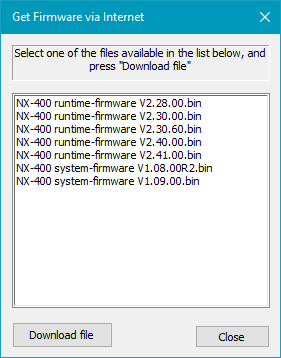
Pressing the "Get update via Internet" button, will show a list of available firmware files as seen below:
For NX32L devices, only files for the connected device type will be shown. For other devices, all the available files are shown.
It is very important that the correct file is selected.
For Linux-based RTCU devices (LX / NX) there are several types of firmware files:
Runtime-Firmware. This is the primary firmware that implements most of the functionality of the RTCU platform. This can best be compared with the single firmware on non-Linux based devices. This firmware file is most frequently updated.
System-Firmware. This main firmware includes the complete Linux system and all the necessary files to run the system. It also includes a runtime firmware that can later be upgraded. This firmware is not frequently updated.
Monitor-Firmware. This firmware is a "backup" firmware used if the System-firmware is not present or is under update. This firmware is rarely updated.
|